

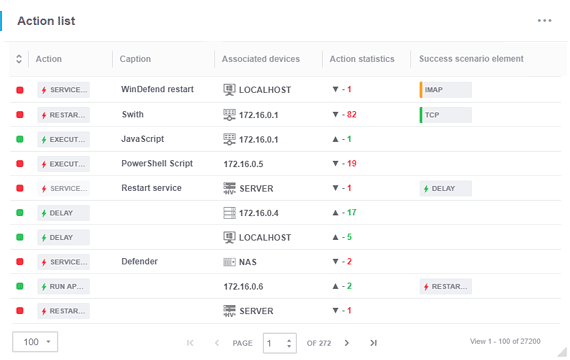
Monitoring actions are used within scenarios to automate the process of remotely fixing issues related to downtime and operational failures. They are necessary to automatically launch operations that can prevent system failures and allow for efficient management of the enterprise network.
Actions can trigger operations either on a previously-created set schedule or depending on the result and sensor state.
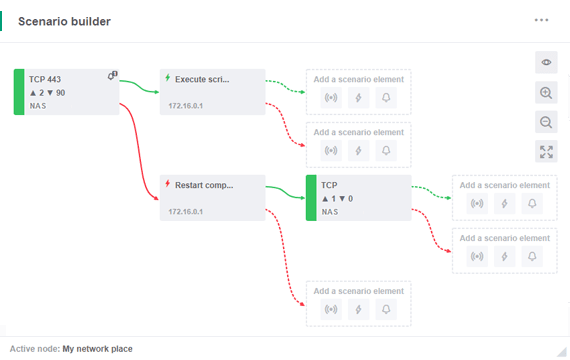
Scenario Builder is used to create actions and assign them to sensors as well as to create unique combinations of sensors and actions. In order to solve an issue by, for instance, shutting down the computer or restarting certain scripts, all that you need to do is launch the Scenario Builder, select the network node where the action should take place, and choose the required action type and its parameters. You can also use the task scheduler to set up periodic action execution.
Each action can be tracked in the Activity log as well as in the dedicated reports.
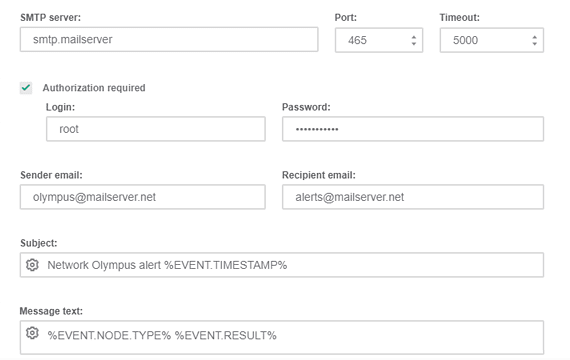
Notifications are used to provide information, such as monitoring state changes, and help instantly notify administrators about sensor and action results. They are closely connected with actions and provide significant efficiency improvements when combined. Notifications can also function independently, without associated actions and can be highly beneficial on their own.
Notifications can be triggered by any sensor or action, depending on the check results.
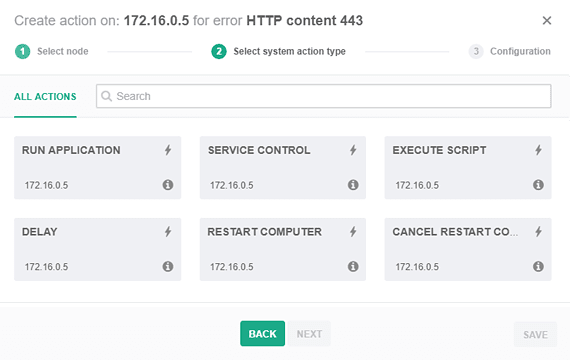
Actions:
Notifications:
Use Network Olympus for free for 30 days. Download the trial without activation or registration. Add as many devices to your network as you want.
Choose the license type that is the perfect fit for your business needs:
Monitor an unlimited number of devices free of charge for 30 days.
No activation or registration required.
All-in-one solution for companies with more than 10 devices.
Includes premium support at no additional cost.
No time limit. Connect up to 10 devices.
Other Features Take your company's network administration to the next level with with Softinventive Lab’s solutions.